网站登录接入第三方接口--github登录
官方文档:https://developer.github.com/apps/building-oauth-apps/authorizing-oauth-apps/
一、注册应用(注册应用官方文档)
注册应用(注册应用官方文档)
① 依次打开 setting > Developer settings > OAuth Apps
② 点击 Register a new application 注册一个新的应用
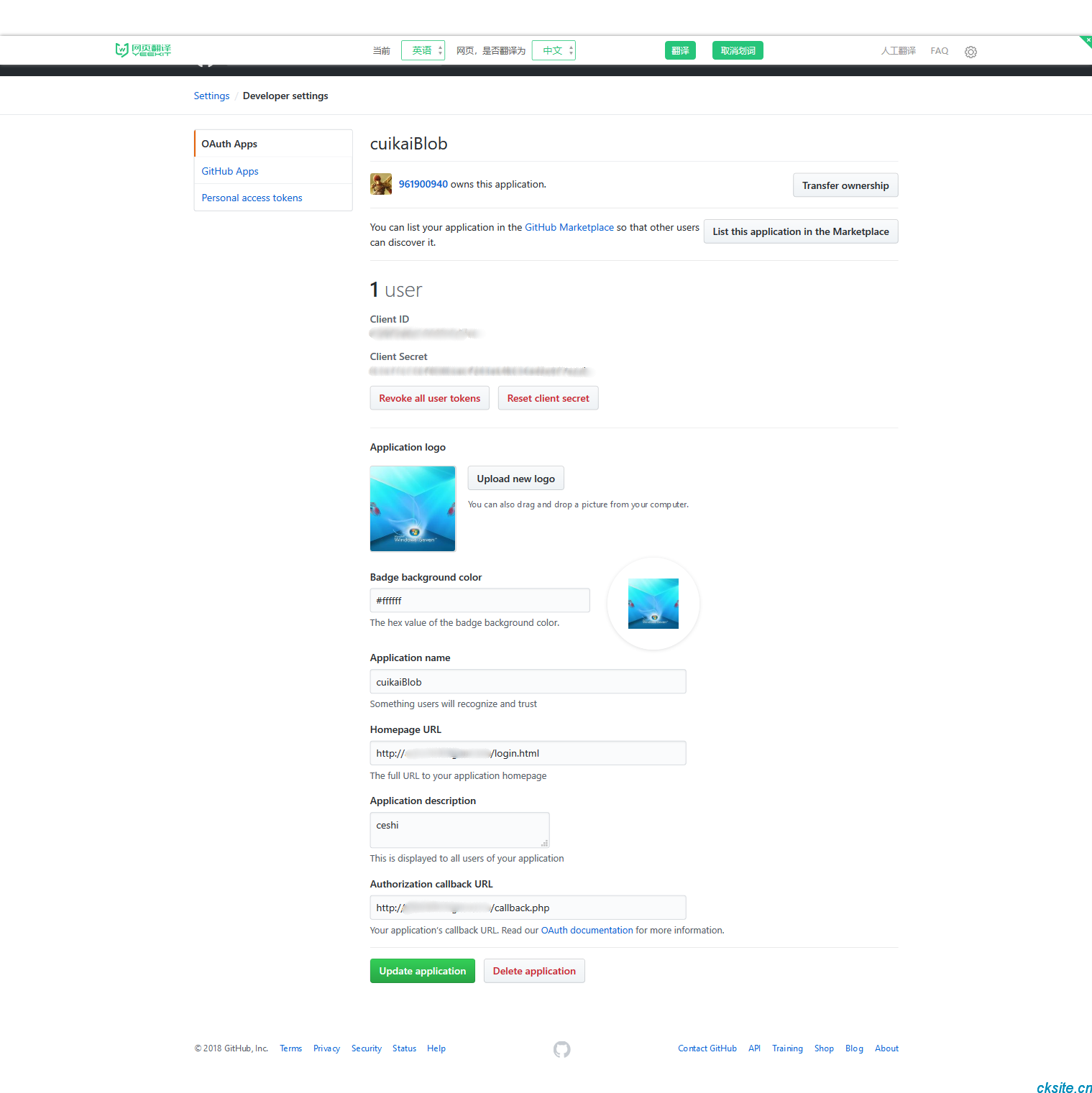
③ 注册应用页面需要填写【Application name(应用名称)、Homepage URL(应用链接)、Application description(应用描述)、Authorization callback URL(回调地址)】
④ 创建应用界面为下图左,应用创建完成为下图有,其中接入登录需要Client ID和Client Secret,需要妥善保存
⑤ 这里超人测试连接地址为:http://域名/login.html
二、操作流程
2.1 html模板页面
<!DOCTYPE html>
<html>
<head>
<meta charset="UTF-8">
<title>Document</title>
</head>
<body>
    <a href="/login.php">点击登录GitHub</a>
</body>
</html>
2.2 重定向到用户请求到github,获取code信息
需要https://github.com/login/oauth/authorize向发送get请求,发送请求时需要携带参数: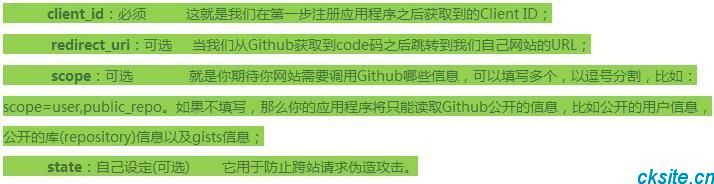
Client_id正确的话,github将返回code,并重定向到redirect_uri:http://域名/callback.php?code=c1b8874ef847b65a3261
点击html页面中git登录按钮请求地址:github/login/log中具体代码如下
header("Location: https://github.com/login/oauth/authorize?client_id=8b8875deac92d6ebf7a2");exit;2.3 通过code获取access_token
获取code之后,需要向github以post方式请求
https://github.com/login/oauth/access_token获取access_token,post参数:

如若请求有效,github将返回access_token,默认情况下,返回的数据格式如下:
string(78) "access_token=0cc96942c7843583d352d0c552b14dff5c275477&scope=&token_type=bearer"
如若需要返回以下json格式数据,需要在请求的时候设置Accept头信息:Accept: application/json
如若需要返回以下xml格式数据,需要在请求的时候设置Accept头信息:Accept: application/xml
这里,我们也可以自行从该字符串中获取access_token
2.4 获取登录用户信息
根据上一步获取的access_token,再get方式请求https://api.github.com/user?access_token=xxx即可获取用户信息
string(1151) "{
    "login":"961900940",
    "id":13363405,
    "node_id":"MDQ6VXNlcjEzMzYzNDA1",
    "avatar_url":"https://avatars3.githubusercontent.com/u/13363405?v=4",
    "gravatar_id":"",
    "url":"https://api.github.com/users/961900940",
    "html_url":"https://github.com/961900940",
    "followers_url":"https://api.github.com/users/961900940/followers",
    "following_url":"https://api.github.com/users/961900940/following{/other_user}",
    "gists_url":"https://api.github.com/users/961900940/gists{/gist_id}",
    "starred_url":"https://api.github.com/users/961900940/starred{/owner}{/repo}",
    "subscriptions_url":"https://api.github.com/users/961900940/subscriptions",
    "organizations_url":"https://api.github.com/users/961900940/orgs",
    "repos_url":"https://api.github.com/users/961900940/repos",
    "events_url":"https://api.github.com/users/961900940/events{/privacy}",
    "received_events_url":"https://api.github.com/users/961900940/received_events",
    "type":"User",
    "site_admin":false,
    "name":"cuikai",
    "company":null,
    "blog":"",
    "location":null,
    "email":null,
    "hireable":null,
    "bio":null,
    "public_repos":7,
    "public_gists":0,
    "followers":0,
    "following":1,
    "created_at":"2015-07-16T09:26:59Z",
    "updated_at":"2018-06-07T15:16:54Z"
}"
遇到的坑,获取用户信息时,get提交需要User-Agent,否则会提示以下错误!!!阅读该官方文档,得知就是把User-Agent设置成你的GitHub的用户名或者应用名,这里我设置的是GitHub的用户名。
string(214) "Request forbidden by administrative rules. Please make sure your request has a User-Agent header
(http://developer.github.com/v3/#user-agent-required). Check https://developer.github.com for other possible causes.
代码地址:链接:https://pan.baidu.com/s/1Fomu-5ZFUTzDV73Xvg6O6Q 密码:6aln
①修改Client ID
②修改Client Secret
参考地址:https://blog.csdn.net/zhuming3834/article/details/77649960
本文为崔凯原创文章,转载无需和我联系,但请注明来自冷暖自知一抹茶ckhttp://www.cksite.cn
- 上一篇: centos7没有安装ifconfig命令的解决方法
- 下一篇: 算法函数

- 最新评论
- 总共0条评论